Friday, 13 March 2009

Fix-it-Friday - Cutie Pie goes pink!


Cutie-Pie goes pink!

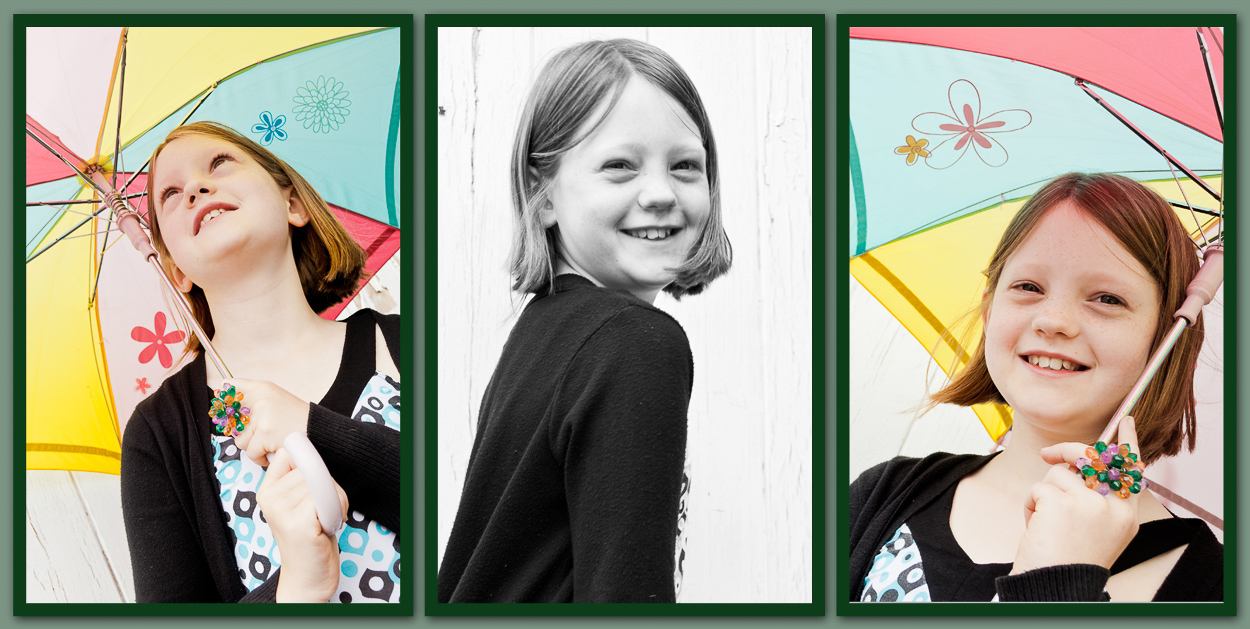
I can't wait for Friday's now!! This weeks was really a challenge though as it was already SOOO gorgeous!, but here's my take on it :D

This sweet little girl, I was convinced, would love pink!

Here's what I did - all in Premium Picnik :D;

I started by checking the 'local contrast' box, then upped the exposure, contrast & brightness just a little each (forgot to jot down the % -sorry). 

I cropped it - obviously!!

Then, in the 'create - effects' mode, I selected 'soften' and raised this, but I brushed over her eyes so as not to soften their sparkle. I had the brush very soft for this effect.

Next, I took it into black & white, but used a pale pink hue, at 36% fade. I toyed with bringing her lips back a little, but left it in the end.

I then selected the 'matte' effect - chosing a pale-ish pink, I set it to fade 68%, strength 84% and size 80% (until I liked the look of it basically!).

For the framing I used 'reflection' at full blur and fade, and then the 'matte museum' with a small pale pink inner frame - to help it look like a continuation of the photo-frame (or vice-versa).

I hope you like it :D

Feedback PLEASE!!
Cx

OK - so I learnt how do sharpen her eyes and then played some more... I think my favourites are the postage stamp and pink frame. 1 & 2 are with and without frame, as are 4 & 5, but do you notice the 'little extra' in the last one? What do you think? (Click on any one to see it bigger)


Don't forget to take a look at what other folks have
done with this lovely photo this week.

Wednesday, 11 March 2009

For the Record...

Just for the 'passers by' amongst you these are some of the other photos that I played with the cropping of this week - I was pretty pleased with the results, but as ever, am happy to hear your critisms! I've put in the 'sooc' (straight out of camera) pics just so you can compare the before and afters :D

None of these got entered because I'd already submitted before I fiddled with them, howeve all but the odd B&W one would have been a strong contenders for entry imo - and even that one would have fitted well in the 'creative' straites! I guess I can always enter them when they 'fit' the catagory :D

We only have two P&S cameras in our house atm. The first picture was taken on my Canon A1000 IS and the other two on my Fuji Finepix F601Zoom. I am working at getting the most I can from these while I save up for a 'real' camera for myself and a bridge camera for my son (whose photography can be seen HERE) - and then we are going to take a course together to learn to do this all 'properly'!!

All of these below are all edited using premium Picnik alone.


Sunday, 8 March 2009

Beautiful Dreamer - Creative Crop -kids

Beautiful Dreamer.


This is what I came up with in the end for my kids entry this week. I have been searching my photos for 'natural light' shots that I thought would appeal to this week's judge and also would make a good 'creative crop' entry - and I failed abysmally. All the same I hope you enjoy this crop and edit of my little man.

Any thoughts and comments I am only too pleased to hear - I am learning all this as I go along. I am VERY impressed with Picnik though.   I had to clone N's chin to lose the blanket - does it show? I have done a little editing in the past and this is by far the easiest 'make-over' program I have used to date :D

Here is the original;


Does anyone know though, of a FREE program where you can actually angle/rotate the crop field before you 'accept' it, rather than having to crop and then rotate (or vice-versa) - which I find a bit limiting in all honesty?

Don't forget to go and have a look at all the other wonderful 'creative crops' that people have come up with this week - over at www.iheartfaces.com!

Two heads - Creative Crop - adult entry.

TWO HEADS ARE ALWAYS BETTER THAN ONE!


This was taken of my two good friends one New Year when they had stayed with us and were about to leave.

Here's the original - I really went to town on this one!!


 All feedback and comments welcome - good and bad - let me know what you think!


"Don't forget to go and see what fun so many other folks have had with their 'creative cropping' this week - at www.iheartfaces.com!"

Saturday, 7 March 2009

FIX-IT FRIDAY - Contemplation - I wonder


This is my second attempt at a fix-it and again I am pretty pleased with it :D I think I can actually edit pictures better than I take them!! When I played with the cropping and made him look upwards I felt that he looked as if he were sky-gazing and with the colours as I've set him it's as if he is watching the sunset.  


The blank space definately needed words - as others have done, but I felt it didn't need much - his face says it all.

So, what did I do..? Now that's the tough bit - remembering!
I know I did auto-exposure, then rotated and cropped. 
I played with the colours until I found what I liked.
There was a little sharpening and then a touch of softening.
I used the clone tool to remove the tear, as although I liked it, it didn't fit with my 'look' very well.
I warm-sepia-d the background (sepia, reverse & then paint the background)
Used the Matt effect (action) and chose the pinky colour for the edges.
Added the words.
Lastly, added the 'reflection' border - tweeked it - saved it - added a second!

I may have done other things too, but the ones I've detailed were definately the main ones. It's hard to remember what else I've done - I just click about until I see what pleases me :D

Hope you like it - PLEASE give me feedback - I'm pretty new to all this and need all the advice I can get!!

Caroline.

Don't forget to take a look at what other folks have 
done with this lovely photo this week.

Fit-It Friday - Red Head no longer.

I know this is weeks old, but I decided to have a play with Picnik ( free edition) and thought this photo would be a challenging test :) I was so pleased with my edits that I decided to upload them anyway, despite it being weeks ago. What do you think? 


Don't ask me what I did - I'm not really sure! I just played! I do know there was some cropping and rotating though :D My fav is the second one - it just seemed so unusual. I know I used the 'adjustable threshold' in the sandbox for that one, and then I just kept tweeking! In the second one I used sepia (reverse) to change the colour of the wood behind her, because when I had warmed her hair to a firey red it all seemed too much the same colour. I know there was some sharpening (for the eyes) and some brightening to ease out her extensive freckles - without losing the effect of their beauty all together.


Click here to see the other folks edits of this week's Fix-it Friday :)


Wednesday, 4 March 2009

Mr & Miss Messy

I had to find my entries in a hurry this week as I didn't know you'd changed the closing day - until today! So these are unedited. I wanted to concentrate on editing my beginners entry more this week - where I think I really am at in all honesty! Still these photos are fun, so enjoy :D

Adult entry; 


Paul feeling a little 'ogrely swamped!!' 

Sadly this picture is not in good focus and there's not much I can do about it, but it's still fun and VERY messy!! 


Kids entry;


This is a SOOC shot taken a couple of years ago - it's not too bad though :D


"Be sure to go check out all the beautiful faces at www.iheartfaces.com!"

Tuesday, 3 March 2009

SOOC

Messy


"Do I LOOK bovered!!"

This was taken of my daughter a couple of years ago after she had had some fun with spaghetti bolognese! This little mess led to the invention of the verb "to deorangify" in our household!

PLEASE PLEASE take a look at the SOOC shot (it's HERE) just so you can see what I started with :D

How did I do with my editing then? I only have free-editing software (paint.net, GIMP and photoscope) and I am trying to learn more about how to use each of them. So far I think I like paint.net. I'm quite pleased with the overall results of this edit - especially the improvement in the brightness of her eyes and the loss of my son in the background, but what else do you pro's recommend ;) There are things I would still like to do (like crop out the extra sparkles on the top of her head, take out the odd bit of white below her right ear and I've spotted a residual bit of blue cup lurking there too!), but my husband needs the computer with the software on now, so my time is up! :( Other than that...does she need something extra around her left eye? Is there too much red? Is there enough contrast and depth? Are the colours/lighting too dark?


"Be sure to go check out all the beautiful faces at www.iheartfaces.com!"

Wednesday, 25 February 2009

Pondering The Future


This was actually a self portrait by my husband (so if this wins technically HE gets the fame, but we share the blog so that's OK!), and it came out to be one of my favourite pictures of him.  I've edited it into B&W and tweaked the shades a little. You can see how far away his thoughts are as he was contemplating the future and soaking himself in the beauty of Lake Windermere.


"Be sure to go check out all the beautiful faces at www.iheartfaces.com! This weeks theme is black&white :D"

Tuesday, 24 February 2009

I Heart Mud!!


As my little man played in the mud he was heard to declare, "I love mud!!"


"Be sure to go check out all the beautiful faces at www.iheartfaces.com!"

Wednesday, 11 February 2009

Blue Hoo!!


This was taken just after a visit to The Tate (London). I think my girls were experimenting with their own form of art! This particular blue paint was of the rather sticky, sweet variety :D

This is one of my favourite shots in my collection - I love the twinkle of silliness in their eyes :)
Of course for the purposes of competition I have edited it a little ;)

"Be sure to go check out all the beautiful faces at www.iheartfaces.com!"

SILLY DADDY!


I may not be the worlds best photographer, but I think I might be in with a fighting chance this week! 

This shot is of our lovely Daddy oiking the small ones down from the monument at Trafalgar Square - I just love it :D You can see the all the laughter that came with this silly moment!


"Be sure to go check out all the beautiful faces at www.iheartfaces.com!"

Wednesday, 4 February 2009

I Fell in Love...


A long time ago I fell in love with the smile in these eyes :)

Somewhere in there you can see the cheeky boy, the loving brother & husband and the thoughtful man. He has a depth to his eyes that I simply adore!


"Be sure to go check out all the beautiful faces at www.iheartfaces.com!"

Tuesday, 3 February 2009

Just look into my eyes...


My little man at the end of a long walk. I think the look in his eyes is one of satisfaction mixed with weariness. I have cropped out the rest of the shot - he is standing on a little stone across a stream and he didn't want to get his feet wet, so perhaps there is a little hint of worry there too! I've put the full shot HERE if you want to have a look :)
I had a go at getting that 'cross-processed' look that everyone has been chatting about - how did I do? Also on 'rule of thirds' and interesting perspectives. I think this fits on all accounts, so I'm hopefull ;)


"Be sure to go check out all the beautiful faces at www.iheartfaces.com!"

For the record

You can't pull the wool over my eyes!!


Ok so not technically MY pet, but a 'possible' pet none-the-less I thought I'd try to get away with it ;)

I liked the angle & the contrasting colours on this one.


"Be sure to go check out all the beautiful faces at www.iheartfaces.com!"

I ♥ FACES

I ♥ FACES ~ WEEK 10 - “JUMP FOR JOY!”

I ♥ FACES - Week 7 - "I Wanna Dance!"

I ♥ Faces - Week 2- “Best Face"

I ♥ Faces - Week 27 - Pets

I ♥ Faces - Week 31 - "Crazy, Silly, Funny Faces!!"

I ♥ Faces - Week 35 (ii) - “PhotoJournalism"


Social Butterfly Award :D

Ten Minutes From Home

TMFH
Capturing Your Memories

Communal Global

You Capture

Photobucket

5 Faves Friday

FFFpub copy
<center><a href="http://frog-photoblog.blogspot.com/search/label/5FF"><img src="http://farm3.static.flickr.com/2776/4427279169_ddd077ec9b_m.jpg" width="212" height="240" alt="FFFpub copy" /></a><center>

BEST SHOT

Photobucket

SOOC Saturday

Followers

Recent Visitors

Instagram Gallery

  © Free Blogger Templates 'Photoblog II' by Ourblogtemplates.com 2008

Back to TOP